8 Reasons Behind Poor Google Ads Performance
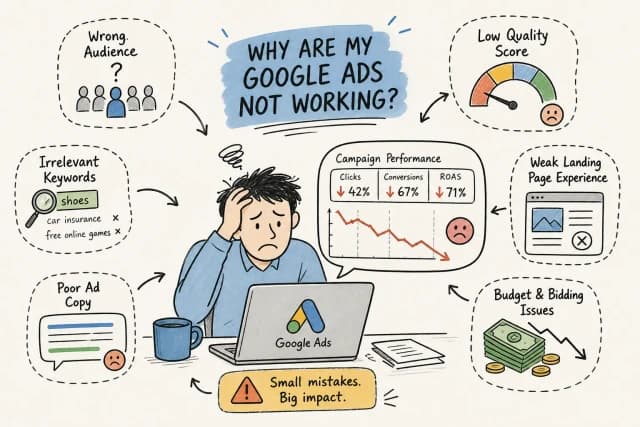
Your Google Ads account is spending. The clicks are coming in. But the sales or leads are not matching the numbers on paper, and every week you sit with the same uncomfortable question: where is the money actually going? That disconnect, that gap between spend and return, is a classic case of Google Ads poor performance, and it is a diagnostic problem, not a mystery. Almost every case of underperforming search ads has a traceable cause that shows up clearly once you know where to look.
The real issue is that most businesses troubleshoot Google Ads by staring at the wrong reports. They check the headline metrics, see that spend is moving, assume the campaign is working, and move on. What they miss are the structural failures happening beneath the surface: broken conversion tracking, budget exhaustion at the wrong time of day, bid strategy changes that never stabilised, or match types quietly burning through budget on irrelevant queries.
At ThinqMedia, the team is inside client accounts every single day across e-commerce, fintech, real estate, and SaaS verticals. The same eight causes appear repeatedly, regardless of industry or spend level, and this article covers all of them. Think of the eight as ThinqMedia's diagnostic taxonomy, built from daily account work rather than theory. They are grouped by category below, followed by a structured recovery sequence you can run in the right order. By the end, you will know what is most likely causing the performance drop in your account and exactly how to confirm it.
Why Google Ads poor performance happens: budget and bid strategy problems
When your budget runs dry before your audience is most active
Daily budgets do not just limit spend; they limit auction participation. When a campaign exhausts its budget by early afternoon, it stops entering auctions for the rest of the day, including during peak buying hours when conversion intent is highest. The result looks like a mysterious performance dip, but the explanation is straightforward: the ads simply stopped showing when it mattered most.
The fix begins with the "Hourly" dimension in your campaign report. Filter by hour of day and map where your spend is heaviest. If the bulk of the budget is consumed before mid-afternoon and your conversion data shows purchases or lead submissions clustering in the evening, you have a timing misalignment. Options include increasing the daily budget, applying ad scheduling to concentrate spend on high-intent hours, or adjusting bids by time of day using bid adjustments.
How bid strategy changes trigger a performance learning period
Every time you switch Smart Bidding strategies, adjust a tCPA target, or change a tROAS value significantly, Google's algorithm enters a learning period. During this phase, the system is recalibrating its predictions using live data, and performance metrics often deteriorate before they improve. According to Google's Smart Bidding guidance, for most campaigns with sufficient conversion volume, this period lasts seven to fourteen days; for lower-volume accounts, it can stretch to four weeks.
The compounding problem is that frequent edits reset the learning period entirely. Every new change adds to the instability. The recommendation is deliberate: make one meaningful change at a time, allow sufficient time for the algorithm to calibrate, and resist the urge to intervene again before the learning period completes. Patience here is not passive; it is the correct strategic decision.
Quality Score and ad relevance issues costing you more per click
Why a poor expected CTR raises your costs across the whole account
Quality Score comprises three components: expected CTR, ad relevance, and landing page experience. Google does not publish exact weightings for these components, but expected CTR and landing page experience are generally the strongest practical levers, because they directly influence Ad Rank, which determines how often your ads appear and at what cost. A low expected CTR signals to Google that your ad is unlikely to satisfy the searcher, so the system either shows it less often or charges more per click to maintain position.
Poor CTR is frequently a copy problem masquerading as a budget problem. If your headline does not closely mirror the language and intent behind the search query, click-through rates suffer regardless of how much you are spending. Review your top keywords and ask honestly whether the ad copy reflects exactly what someone who typed that query is looking for. Misalignment at this level is one of the most consistent causes of a campaign performance drop in Google Ads.
Landing page experience as a silent conversion killer
A weak landing page damages performance from two directions simultaneously. First, it lowers your Quality Score, which raises CPC and reduces how often your ads are shown. Second, it reduces conversion rate because visitors arrive and do not find what the ad promised. You are paying more per click for traffic that bounces faster. That combination compounds quickly on any meaningful budget.
The warning signs are consistent: high bounce rates, slow load speeds, pages that bury the offer in irrelevant content, or a generic homepage receiving traffic from specific, high-intent ad groups. Each ad group's landing page should be tightly aligned with the keyword theme and search intent behind that group. Sending all traffic to a homepage is one of the clearest structural mistakes in underperforming search ads, and it is one of the easiest to fix once identified.
Keyword and targeting mistakes eating your budget silently
Negative keyword conflicts blocking your best queries
Overly aggressive negative keyword lists are one of the most underdiagnosed causes of low impressions in Google Ads. When a negative keyword list is applied at the campaign or account level without careful review, it can accidentally exclude high-intent searches that closely match your target audience. The result is a sudden drop in impressions that looks like an auction problem but is actually self-inflicted.
The diagnostic is straightforward. Pull the Change History report and match the dates against the timestamp of any new negative keyword lists that were applied. If a list was added around the time impressions dropped, export it and review each term for over-exclusion. Remove any negatives that could be blocking genuinely relevant queries, then monitor impression volume over the following 48 hours to confirm recovery.
Broad match keywords and the budget drain most people miss
Broad match keywords expand your ads to loosely related queries, which can produce substantial traffic on paper while delivering very little in actual conversions. On smaller budgets, this is particularly damaging because a handful of broad match terms can consume the majority of available spend on irrelevant searches before the algorithm has enough conversion data to self-correct. The volume looks healthy; the return does not.
Check your Search Terms report weekly and sort by cost descending. As a widely used practitioner rule of thumb, any term that has spent more than one to two times your target CPA with zero conversions is a negation candidate, though the right threshold will vary by account and industry. Look specifically for informational intent queries such as "how to," "free," or "DIY," job-related searches, competitor brand names, and queries from audiences clearly outside your service scope. Starting campaigns with exact and phrase match on tighter budgets keeps spend controlled until the account has the conversion data to support broader expansion.
Technical failures your performance dashboard won't show you
Broken conversion tracking: the issue that corrupts everything downstream
When your conversion tracking tag breaks or fires incorrectly, Smart Bidding begins optimising against wrong or missing data. The algorithm does not know the tag is broken, it adjusts bids based on what it sees, which is now a distorted picture of reality. This is one of the most damaging drivers of Google Ads poor performance because it is invisible in the headline metrics until you check actual tag health directly.
Go to your Conversion Actions report and check for any status warnings or unusual drops in recorded conversions. Then use the Ad Preview and Diagnosis tool alongside Google Tag Assistant, both documented in Google's official Ads help centre, to verify that the conversion tag is firing correctly on your actual thank-you page or target URL. Do this check before making any bid or budget adjustments. Fixing bids on top of broken tracking compounds the problem rather than resolving it.
Ad disapprovals and rising auction competition
Ads can be disapproved after a Google policy update even if nothing in the account was changed. When this happens, impressions can fall to zero overnight with no obvious cause visible in the standard dashboard. Check the Status column in your Ads view regularly, and filter specifically for disapproved ads after any reported policy changes from Google. Depending on the nature of the violation, reinstatement may require a straightforward edit or a formal appeal, simpler policy issues are often resolved quickly, but account-level or repeat violations can take considerably longer and may need more substantial remediation. Always check Google's policy documentation to understand what is actually required before assuming a quick fix is available.
Separately, the Auction Insights report reveals whether your impression share has declined because competitors have raised their bids or improved their Quality Scores. This is distinct from an internal account problem, but it requires a different response: improving your own ad quality, adjusting bids, or refining targeting rather than looking for something broken internally. Both scenarios produce similar symptoms at the surface level, which is why running Auction Insights early in the diagnostic process saves significant time.
Fixing Google Ads poor performance: the recovery framework
The diagnostic sequence to run before making any changes
Sequence matters here. Start with the Change History report and confirm exactly what was altered and when, comparing those timestamps against the date the performance drop began. Then verify conversion tracking is firing correctly on your target pages. Next, run the Ad Preview and Diagnosis tool to confirm your ads are actually serving. After that, check Auction Insights to identify whether competitive pressure has shifted. Finally, review the Search Terms report for irrelevant query spend that is diluting your budget.
Making bid or budget changes before confirming whether tracking is broken or ads are disapproved is the fastest way to layer one problem on top of another. The sequence protects you from that. Fix what is structurally wrong first, then assess whether bid or budget changes are warranted based on clean data.
Why daily optimisation catches problems monthly reviews always miss
Many businesses rely on monthly Google Ads reviews. That means a broken tracking tag, a budget exhaustion issue, or a negative keyword conflict can silently drain spend for four full weeks before anyone notices. At ThinqMedia, the team operates on daily optimisation checks across every managed account, which means these issues are caught and corrected before they compound into significant revenue loss. The difference between monthly and daily oversight is often the difference between a recoverable dip and a wasted quarter.
This is not a pitch for complexity. Daily oversight does not mean making daily changes. It means reviewing the right signals every day so that when something breaks or drifts, the intervention happens within 24 to 48 hours rather than 30 days.
Realistic timelines for performance to stabilise after fixes
After resolving structural issues such as broken tracking, disapproved ads, or keyword conflicts, campaigns using Smart Bidding need a minimum of seven to fourteen days to stabilise. Low-volume accounts may require up to four weeks before performance metrics become reliably readable. During this window, avoid making additional major changes. Each significant edit risks resetting the learning period and extending the recovery timeline further.
Set your evaluation window clearly before you start. Decide in advance that you will assess performance after a full conversion cycle has completed, not after 72 hours. That discipline prevents the reactive changes that restart the learning period and make recovery much harder to track.
Getting your account back on track
Google Ads poor performance is rarely the result of random bad luck. Every performance drop covered in this article has a specific diagnostic check that either confirms or rules it out within minutes. The eight causes fall into four clear categories: budget and bidding, ad quality and landing pages, keyword and targeting structure, and technical failures. Each one is findable if you look in the right place.
Run the diagnostics in order. Start with what changed and when. Verify your measurement is clean. Check whether your ads are actually showing. Then work outward to competitive pressure and search query drift. Apply the relevant fix, document what you changed, and give the campaign time to stabilise before making your next judgement call on performance.
The accounts that recover fastest are those managed with consistent daily attention rather than reactive monthly reviews. If you want help diagnosing Google Ads poor performance in your own account, or if maintaining that level of oversight internally is not realistic for your team, working with a performance-focused partner who is inside the account every day is the logical next step. Get in touch with the ThinqMedia team and let's look at what is actually happening inside your campaigns.
Admin Strategist
Thinq Media Strategy