Low ROAS on Google Ads: Causes and Fixes
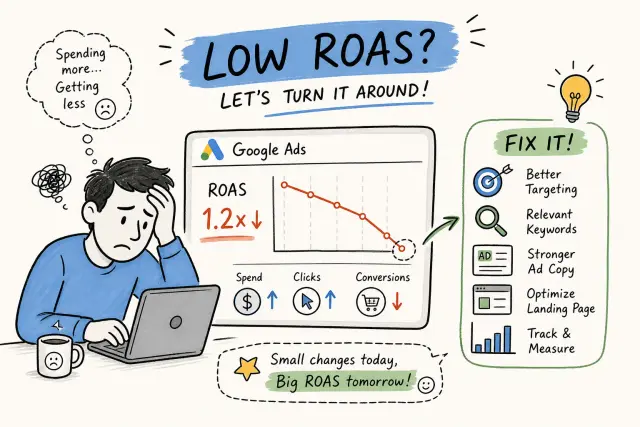
If your Google Ads return on ad spend is consistently below target, you already know the frustration: campaigns are live, clicks are arriving, the dashboard shows activity, and yet when you calculate the numbers at month's end, low ROAS on Google Ads is the only conclusion you can reach. The harder problem is not recognising it. It is not knowing where to start fixing it.
Low ROAS on Google Ads is almost never caused by a single mysterious flaw. In auditing accounts across e-commerce, fintech, and retail verticals, the same failure clusters appear repeatedly: broken tracking, wasted budget on irrelevant queries, bidding strategies fighting against poorly structured campaigns, and landing pages that undo what the ad started. Each problem on its own chips away at your return. Combined, they produce the disappointing numbers you are looking at now.
This article walks through the full diagnostic: benchmarks, root causes, bidding mechanics, targeting hygiene, and what a structured turnaround looks like when all the right levers are pulled. No vague advice, no filler. Only the fixes that produce measurable improvements in return.
What qualifies as low ROAS and how to benchmark correctly
Before you start adjusting campaigns, you need to know what number you are actually chasing. Comparing your account to the wrong benchmark is one of the most common mistakes, and it leads to either unnecessary intervention or missed problems that compound quietly over time.
2026 ROAS benchmarks by campaign type and industry
Google Search campaigns, because of their high purchase intent, tend to produce the strongest returns. Based on 2026 industry benchmark data, the median for Search sits around 5x. Shopping campaigns are typically the second-strongest format for e-commerce brands, with benchmarks ranging from roughly 2.9x to 5.4x depending on the account and category. Performance Max campaigns generally come in lower, around 2.5x to 4.5x. By industry, general e-commerce accounts typically target 4x to 6x, while high-value verticals such as legal services can justify 6x to 8x or higher. B2B SaaS is a different calculation entirely: first-purchase ROAS is often misleading, and performance should be evaluated against customer lifetime value rather than single-transaction revenue.
Why your margin structure matters more than industry averages
A 4x ROAS with a 60% gross margin is profitable. That same 4x ROAS with a 20% margin may not cover your costs. Before deciding whether your account is underperforming, calculate your own break-even ROAS by dividing 1 by your gross margin percentage. If you are operating at 25% margins, your break-even is 4x. Every point above that is profit; every point below is a loss disguised as activity. Industry averages are a useful reference, but your margin structure is the only benchmark that actually tells you whether you have a problem.
The root causes behind low ROAS on Google Ads
Most accounts suffering from poor returns have more than one problem active simultaneously. The challenge is separating signal from noise, and a structured audit approach, rather than guessing at the most visible symptom, is what produces a lasting fix rather than a temporary one.
Conversion tracking and attribution errors that hide real performance
This is the single most overlooked cause of poor reported ROAS. Failure modes include broken purchase tags that never fire on the confirmation page, GCLID or UTM parameter loss through multi-step checkouts, and zero-value pass-backs where sales are recorded but the revenue amount is not transmitted. Attribution window mismatches are equally damaging: if your reporting window is shorter than your actual customer journey, late conversions simply do not appear in the data, and your ROAS looks worse than it truly is. Consent mode restrictions and ad blockers compound the problem by suppressing recorded conversions before they even reach Google Ads. Bad tracking makes a good account look terrible. Fixing measurement before touching any campaign setting is non-negotiable.
Wasted spend from search term contamination
Broad match combined with Smart Bidding, without proper negative keyword coverage, routinely pushes budget into irrelevant queries that will never convert. The gap between what you think you are targeting and what Google is actually matching against is often significant, and it only becomes visible when you pull the full search terms report. High spend with zero or near-zero conversions on unrelated queries is a direct tax on your ROAS, and it is one of the most straightforward problems to fix once you can see it clearly.
Shopping feed problems that suppress qualified impressions
For Shopping campaigns, the product feed functions as both the creative layer and the targeting layer. Missing GTINs, inaccurate pricing data, vague product titles, and incorrect availability values cause Google to either disapprove products or serve them to poorly matched audiences. The result is reduced impression share on the high-intent queries where your products should be appearing, and diluted conversion quality on the impressions that do occur. A feed with multiple disapprovals is actively limiting your campaign's ceiling before any bid strategy is applied.
Bidding strategy fixes that improve efficiency without collapsing volume
Once tracking is confirmed clean and waste is identified, the next lever is bidding. The relationship between tROAS targets and campaign volume is non-linear, and adjusting it without understanding the mechanics is a reliable way to make things worse.
How tROAS targets affect impressions, conversions, and spend
Raising your Target ROAS forces Google to enter fewer auctions and bid more conservatively, which reduces impressions, conversions, and often total spend. Lowering your tROAS opens the bid strategy to more auctions, increasing volume but potentially reducing efficiency. Neither direction is automatically correct. If your current problem is scale, a tight tROAS target is actively strangling your campaigns. If your problem is efficiency, a loose target is spending indiscriminately. Diagnosing which issue you have should precede any tROAS adjustment.
When to use portfolio bidding and how budget headroom affects Smart Bidding
Budget-constrained campaigns limit Smart Bidding's ability to function correctly. Google's published guidance confirms that Smart Bidding Exploration does not work effectively when campaigns are limited by budget. The correct sequence is: check whether the campaign is budget-limited first, create adequate budget headroom, then adjust the tROAS target once the algorithm has room to operate.
Portfolio Target ROAS is particularly effective when you are managing multiple campaigns toward the same revenue goal, because it pools conversion data across campaigns and improves algorithmic learning. Trying to optimise individual campaign tROAS targets in isolation, when a portfolio approach would pool signals more efficiently, is a structural inefficiency many accounts carry for months without realising it. Breaking out of that pattern frequently produces efficiency gains without any reduction in volume.
Cleaning up search terms, audiences, and your shopping feed
Bidding fixes produce stronger results when the underlying targeting is clean. This is the hygiene work most accounts skip because it is manual and unglamorous. It consistently unlocks disproportionate efficiency gains.
Running a negative keyword audit that actually reduces waste
Pull the full search terms report for the past 90 days, a window that balances recency with sufficient sample size, though higher-volume accounts may benefit from a shorter look-back, and filter by spend with zero or low conversions. Group the irrelevant terms into themes and build negative keyword lists segmented by match type. Apply campaign-level negatives for broad exclusions and ad group-level negatives for more granular control. A shared negative list applied across campaigns speeds up ongoing maintenance and ensures that newly identified waste is excluded account-wide rather than being caught campaign by campaign over multiple audit cycles.
Audience exclusions that protect your margins
Excluding past purchasers from prospecting campaigns, removing clearly irrelevant demographic segments, and applying low-intent in-market audience exclusions at the campaign level prevents Smart Bidding from allocating budget to traffic it cannot convert profitably. Customer match lists and remarketing audiences used as exclusions are the most precise tools available here. The goal is not to reduce reach arbitrarily; it is to remove the segments that consume budget without contributing to conversion value, so the algorithm concentrates spend where it actually performs.
Shopping feed optimisation for better match quality and visibility
The highest-impact feed fixes are consistent across most accounts: product titles that reflect actual search queries rather than internal product codes, complete product type hierarchies, accurate GTINs or MPNs for branded products, and regular resolution of disapprovals in Merchant Centre. A well-structured feed expands impression share for high-intent queries and improves the relevance of the traffic that results. Resolving feed disapprovals alone has unlocked meaningful impression share improvements in accounts that had carried those errors silently for months.
What an expert account turnaround actually looks like
Understanding the theory is useful. Seeing how it applies to a real account makes the sequence concrete and easier to follow when you are working through your own audit. The following scenario is representative of the pattern ThinqMedia encounters most frequently across new client accounts.
The account before intervention: a common scenario
Consider a mid-sized e-commerce brand running Shopping and Search campaigns with a consistent monthly spend and a ROAS sitting below their 4x target. The symptoms are familiar: healthy click volume, a conversion rate that does not match the traffic quality, high spend on irrelevant search terms, and a feed with multiple disapproved products. Conversion tracking appeared to be configured, but a closer inspection revealed that the purchase value pass-back from the checkout was intermittently sending zero-value conversion events, meaning a significant number of real sales were being recorded without any associated revenue.
Fixes for low ROAS applied in sequence
The intervention followed a structured order. Fixing the conversion value pass-back came first, because without accurate data flowing into the platform, no bidding adjustment could be calibrated correctly. After confirming that real purchase values were transmitting, the search terms audit identified enough wasted spend to prompt the addition of approximately 200 negative keywords, a figure specific to this account's size and history. The shopping feed was then rebuilt: product titles were rewritten to reflect query intent, GTINs were added for all branded products, and Merchant Centre disapprovals were resolved. Audience exclusions for past purchasers were applied to prospecting campaigns. Only then, with clean data and clean targeting, were the tROAS targets adjusted incrementally. This workflow reflects ThinqMedia's approach to managed account diagnostics: daily, hands-on optimisation grounded in accurate measurement rather than assumptions.
The result: measurable sales growth and what drove it
Over the months following intervention, the account recorded a substantial lift in sales revenue. The largest single gain came from fixing the value tracking, which revealed that the account had actually been performing better than reported ROAS indicated. The negative keyword work produced an immediate improvement in conversion rate by removing irrelevant traffic from the auctions. The feed clean-up compounded those gains over the following weeks by expanding eligible impression share for the high-intent queries where conversions were most likely. Each fix reinforced the others, which is why the correct sequence matters as much as the fixes themselves.
Measurement checks and landing page fixes that lock in the gains
Campaign-side fixes address a significant share of the improvement opportunity. The remainder sits in measurement integrity and what happens after the click, two areas where neglect quietly cancels out gains made elsewhere.
Conversion tracking health checks you should run regularly
Verify that conversion tags are firing correctly using Google Tag Assistant or GTM preview mode on the actual thank-you page. Inspect the network request to googleadservices.com/pagead/conversion/ to confirm that purchase values are passing dynamically, not as static placeholders or repeated default figures. Check attribution window settings against your actual customer journey length; if your typical consideration period is 30 days but your window is set to 7, you are missing a material share of attributed conversions. If your sale closes outside the platform, whether through a CRM, a phone call, or an in-person transaction, ensure that offline conversion imports are configured and uploading consistently.
Landing page changes with the strongest documented conversion impact
Four changes consistently outperform cosmetic redesigns. First, reducing the number of form fields substantially, CRO research and aggregated A/B test data consistently show that shorter forms produce meaningful conversion lifts, with some studies reporting gains of 100% or more when fields are cut from double digits to three or four. Second, using a single, focused call to action removes choice friction and keeps users on one clear path. Third, aligning the page headline to the ad's specific message reduces bounce from mismatched expectations; published CRO findings suggest directional lifts in the 15% to 25% range in controlled tests, though results vary by page type and audience. Fourth, ensuring page load speed under three seconds prevents abandonment before the page even renders, Google and Deloitte research indicates that pages loading in under one second convert at significantly higher rates than slower pages. These four changes should be prioritised above anything else on the list.
Pulling it all together
The diagnostic framework is straightforward when you work through it in the right order. Check your benchmarks against your own margin structure, not industry averages. Audit conversion tracking before touching any bid settings. Run the search term hygiene work and fix the shopping feed. Then adjust tROAS with proper budget headroom in place. Send traffic to a page that is built to convert.
Poor returns on Google Ads campaigns rarely trace back to one isolated problem. It is almost always a compounding set of issues that each reduce your efficiency in ways that are difficult to separate when you are looking at the account as a whole. Addressing low ROAS on Google Ads in the correct sequence, and then monitoring the right metrics, produces gains that accumulate over weeks and compound as each improvement reinforces the next.
If the diagnosis and daily execution belong with a specialist team rather than on your plate, that is what ThinqMedia's managed accounts are built for. Reach out to discuss what a full audit of your campaigns involves.
Admin Strategist
Thinq Media Strategy